An app is spatial intervention: symbols, prompts, buttons, sounds, habits, and feedback loops arranged so people can imagine a new action and then repeat it. Fable started from that kind of ambition. We wanted to build something that felt magical, and if we were lucky, something that could become a real business too.
It did not become the breakout app we hoped for. But it remains one of the most important projects we have worked on because it forced us to confront the full chain of making software: product taste, model limits, App Store bureaucracy, voice quality, pricing, and the uncomfortable distance between a good idea and a paying audience.
The Idea
The idea behind Fable was simple: make it easier for people who don't have time to read, to still consume the content they care about.
Rather than building a standard text-to-speech tool, we chose a podcast format: two AI hosts discussing the content instead of a single voice reading it word for word. A conversation carries more character and perspective. It can surface different angles of a topic in a way that flat narration rarely does.
The target audience was busy people: commuters, professionals, and anyone with a backlog of articles and not enough hours in the day.
Overview
Fable is built across three layers.
- Frontend: a React Native and Expo iOS app: minimal by design, with three tabs, a player, and a create screen.
- Backend: an asynchronous Go pipeline that takes a document or URL, runs it through Google Gemini to produce a structured two-host dialogue script, then synthesises and stitches the audio using either ElevenLabs or Google TTS depending on the user's tier.
- Queue: a Redis queue managed by Asynq, keeping generation work off the request path so the app stays responsive while jobs run in the background.
Product Design and UX
Fable was designed with a single guiding principle: get out of the way. The app does one thing: turns documents and articles into audio. Every design decision was made in service of that. No dashboards, no settings sprawl, no onboarding maze. Three tabs, a player, and a create screen.
The UI is deliberately minimal: lowercase headings, generous whitespace, a muted palette, and dark mode support that follows system preferences. It reads more like a reading app than a productivity tool, which felt appropriate given what it was trying to replace.
The App at a Glance
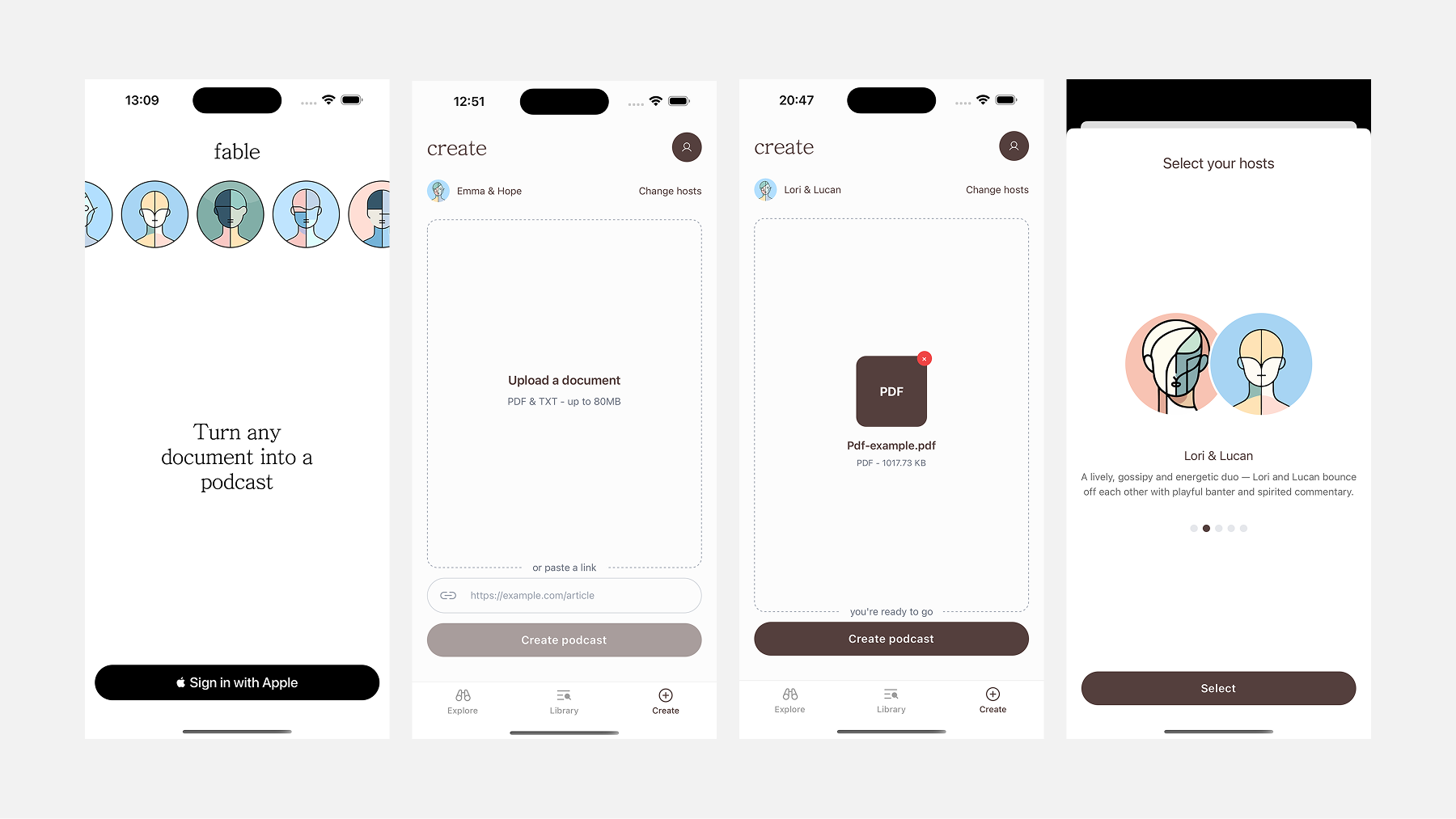
Sign in is a single screen: Sign in with Apple. No email, password, or form to fill out.
Explore is a curated feed of pre-generated podcasts. It gives new users something to listen to before they have created anything, and demonstrates what Fable actually sounds like.
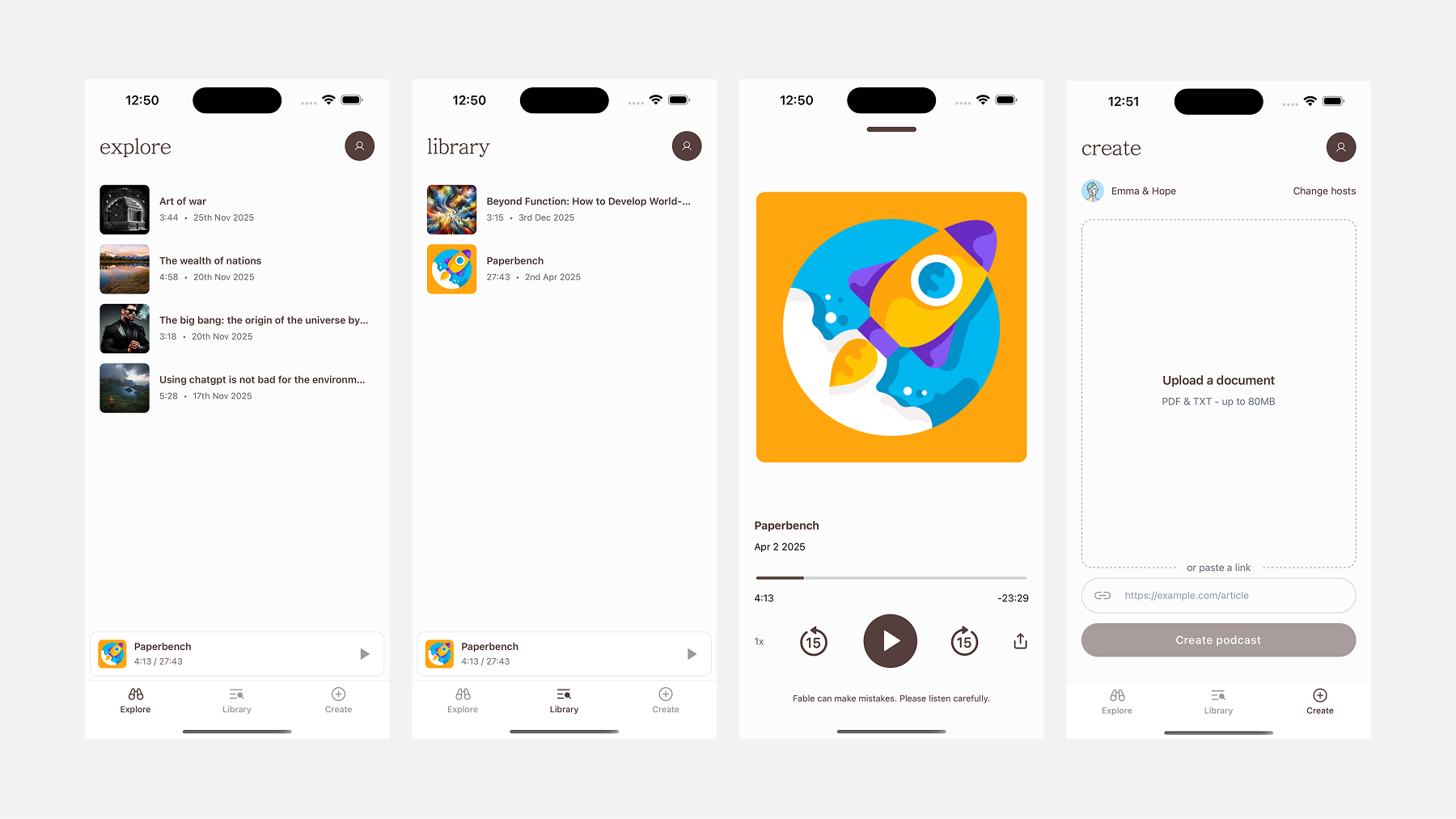
Library is your personal feed: everything you've generated, listed chronologically with duration and date. A persistent mini-player sits at the bottom while audio is playing, so you can browse without losing your place.
Create is where content goes in. Upload a PDF or TXT file, or paste a URL. Hit "Create podcast" and the job is queued in the background.
The player is full-screen: cover art, title, a scrubber, playback speed, skip controls, share, and a summary sheet. A small disclaimer sits beneath the controls: "Fable can make mistakes. Please listen carefully."
Cover Art
Each podcast in Fable has a cover image. Earlier versions used a fixed set of stock images: fine for a prototype, but not scalable or meaningful. The current approach generates abstract cover art automatically on the server. Each image is a unique procedural pattern, giving every podcast a distinct identity without manual curation.
UX Decisions We Reversed
The host picker was removed. Early versions let users choose which AI hosts would narrate their podcast. It was a nice idea, but in practice it added hesitation to a flow that should feel effortless. The backend now selects voices automatically.
The length selector was removed too. Most users did not have a strong preference, and even those who did could not predict how their document would translate to audio time. The backend now determines length based on source content.
Both removals point to the same lesson: in an app where the core value is saving effort, every extra choice is a small tax.
The Share Extension Flow
One UX surface worth calling out separately is the Share Extension: the feature that lets Fable appear in iOS's native share sheet when you share a document from Files or another app.
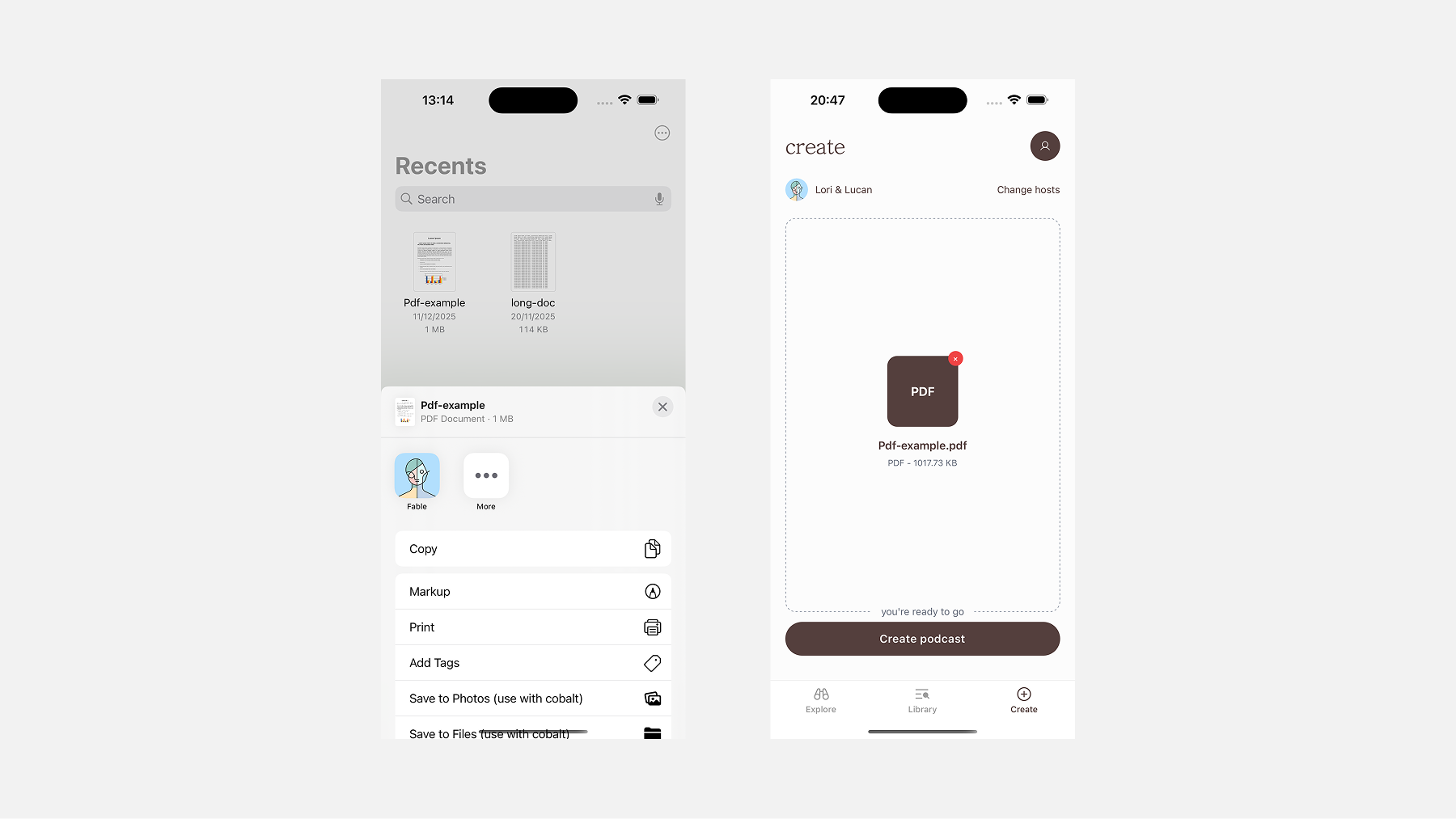
Tap Fable from the share sheet, and the document lands directly on the Create screen, ready to go. No copy-pasting, no switching context. It is the most frictionless path from finding content to generating a podcast.
Building the iOS App
Getting an app onto the App Store starts before you write a single line of code. You need an Apple Developer account, provisioning profiles, bundle identifiers, and signing certificates. Expo abstracts most of this, including auto-submitting builds via EAS.
Publishing Fable independently also meant dealing with the business infrastructure around Apple. To publish in the US, we needed an Apple Developer account with payouts enabled. That meant incorporating a company, opening a bank account, getting a D-U-N-S number, and paying the recurring costs that come with keeping that setup alive.
The bank account was straightforward. The D-U-N-S process was more annoying. Incorporation cost about $500 through Norebase, annual tax filings added roughly $1,000 a year, and Apple's developer program added another $99 annually. None of this is technically part of building an app, but it is part of shipping one.
Where native complexity crept back in was the Share Extension. That feature required a native Swift target, App Groups configuration in Xcode, and additional entitlements approval from Apple.
The Backend Architecture
Fable's generation pipeline is fully asynchronous. When a user submits a document, the GraphQL API accepts the request, creates a database record, and immediately enqueues a job. The actual work happens in the background across three worker stages, each handing off to the next through Redis and Asynq.
extend type Mutation {
  createPodcastFromFile(input: CreatePodcastFromFileInput!, config: ConfigInput): Podcast!
  createPodcastFromWebContent(input: CreatePodcastFromWebContentInput!, config: ConfigInput): Podcast!
  createPodcastFromRawText(input: CreatePodcastFromRawTextInput!, config: ConfigInput): Podcast!
}- Prep Notes: the source material is analysed and summarised.
- Dialogue Scripting: the summary becomes a two-host script.
- Audio Synthesis: the script becomes stitched audio.
Prep Notes with Gemini
The first worker takes the raw source material and passes it to Gemini with a structured prompt. The output is a set of prep notes: a summary, key themes, and host-specific instructions that shape how the dialogue should feel.
genModel.GenerationConfig = genai.GenerationConfig{
  ResponseMIMEType: "application/json",
  ResponseSchema: &genai.Schema{
    Type: genai.TypeObject,
  },
}
Dialogue Scripting
The second worker takes the prep notes and generates a full dialogue script as structured JSON, with each turn tagged by speaker, line, and pacing metadata. JSON made downstream processing deterministic: no regex parsing of speaker labels, no ambiguity about where one turn ends and the next begins.
The prompt evolved around rhythm. Real conversations have interruptions, incomplete sentences, and moments where one host picks up mid-thought from the other. Getting generated dialogue to feel natural meant being explicit about those structures.
Audio Synthesis
The final worker converts the cleaned dialogue JSON to audio. Google Neural2 is cheaper and clean, but consistent to a fault. ElevenLabs costs more, but offers wider dynamic range and more expressive prosody controls.
Pacing mattered as much as voice quality. Spoken conversation has micro-pauses, breath gaps, and longer pauses between topic shifts. The service calculates silence duration for each speaker transition, using provider-native break tags where possible and generated silence clips where needed.
for dialogueNumber, dialogue := range payload.Dialogues {
  podcastBytes, _, _, err := service.GeneratePodcast(ctx, voiceConfig, dialogue)
  isFinalPart := dialogueNumber == len(payload.Dialogues)-1
  err = service.UploadPodcastBytesToR2(ctx, filename, podcastID, dialogueNumber, isFinalPart, podcastBytes)
}
The Frontend Stack
Fable is a React Native and Expo application, built iOS-first. Expo gave the team fast iteration cycles and over-the-air updates through EAS. Expo Router handled navigation, NativeWind handled styling, and Zustand handled global state for auth and the audio player.
Data fetching used Apollo Client against the backend GraphQL API. Audio playback used react-native-audio-api, which gave fine-grained control over decoding, background audio, lock screen controls, and playback speed.
Payments used RevenueCat to manage in-app purchases and subscriptions. EAS Build handled development, internal preview, and production build profiles. Sentry covered production error tracking.
Distribution and Discoverability
The App Store is its own ecosystem, and it caught us off guard. Fable launched simply as "Fable", competing with many other apps sharing the same name across books, stories, and audio categories.
Renaming the app to Fable: Documents to Podcast improved discoverability noticeably. App naming and ASO need to be part of the conversation before you ship, not after you have been struggling to rank for months.
Market Reality
Fable sold 100 minutes of generated audio for $5.99. That price had to reflect the real cost of synthesis, especially when using higher quality voice models. But users were comparing the experience against increasingly strong free alternatives, including NotebookLM and ElevenReader.
The harder problem was not only price. After many rounds of prompt, pacing, interface, and voice iteration, we still could not get the generated conversations to feel as consistently natural as the best competing products. Chaining language models together is powerful, but it is not a cure-all. At some point the ceiling of the available models becomes the ceiling of the product.
We explored pivots: a bookmarking direction, new visual approaches, and more direct marketing support. None of it landed strongly enough to justify continuing to sell Fable as-is. That was disappointing, but clarifying. Not every worthwhile project becomes a company. Some projects are worthwhile because of what they teach you to see.
Closing
Fable was worth making. We shipped an independent iOS app, built a real asynchronous voice pipeline, learned what it costs to publish and sell software in Apple's ecosystem, and ran into the current limits of AI voice products directly rather than theoretically.
If you have a backlog of articles or documents you've been meaning to read, you can still try it at fablepod.com.